Git多颜色输出
git默认的输出是单一颜色的,不仅不够美观,也不容易阅读。实际上,git本身就支持用多种颜色来显示其输出的信息,只需在命令行中运行以下命令来修改git的设置,即可开启多颜色输出:
git config --global color.status auto
git config --global color.diff auto
git config --global color.branch auto
git config --global color.interactive auto
自定义log格式
完成上述步骤后,git log命令的输出虽然有了点颜色,但还是显得枯燥(见下图)。
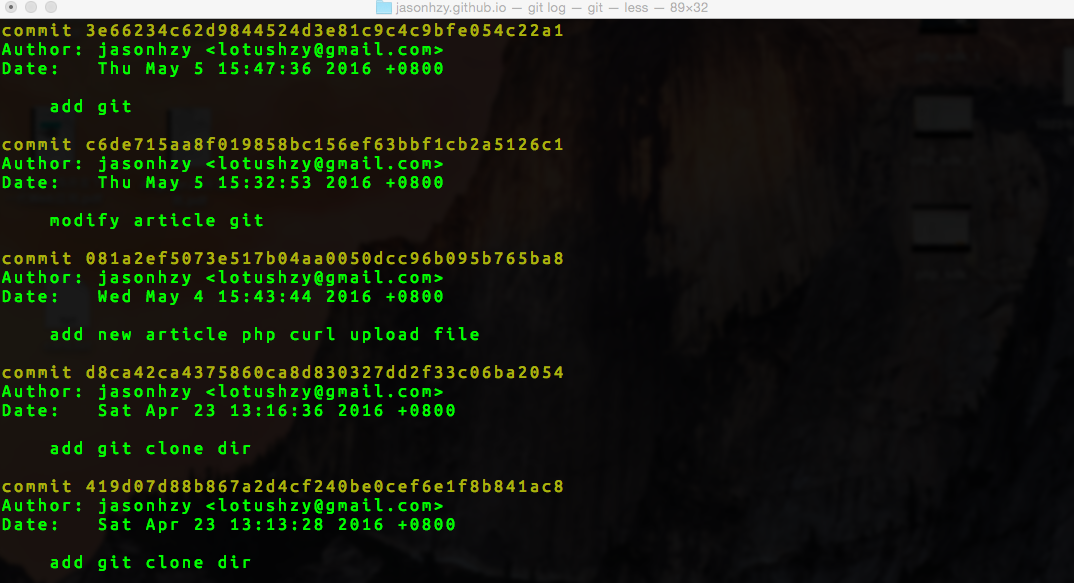
git提供了自定义log格式的功能,尝试输入以下命令:
git log --color --graph --pretty=format:'%Cred%h%Creset -%C(yellow)%d%Creset %s %Cgreen(%cr) %C(bold blue)<%an>%Creset' --abbrev-commit
把上面命令设置一个别名lg:
git config --global alias.lg "log --color --graph --pretty=format:'%Cred%h%Creset -%C(yellow)%d%Creset %s %Cgreen(%cr) %C(bold blue)<%an>%Creset' --abbrev-commit"
设置之后git lg即可查看log,而且显示的更加友好:
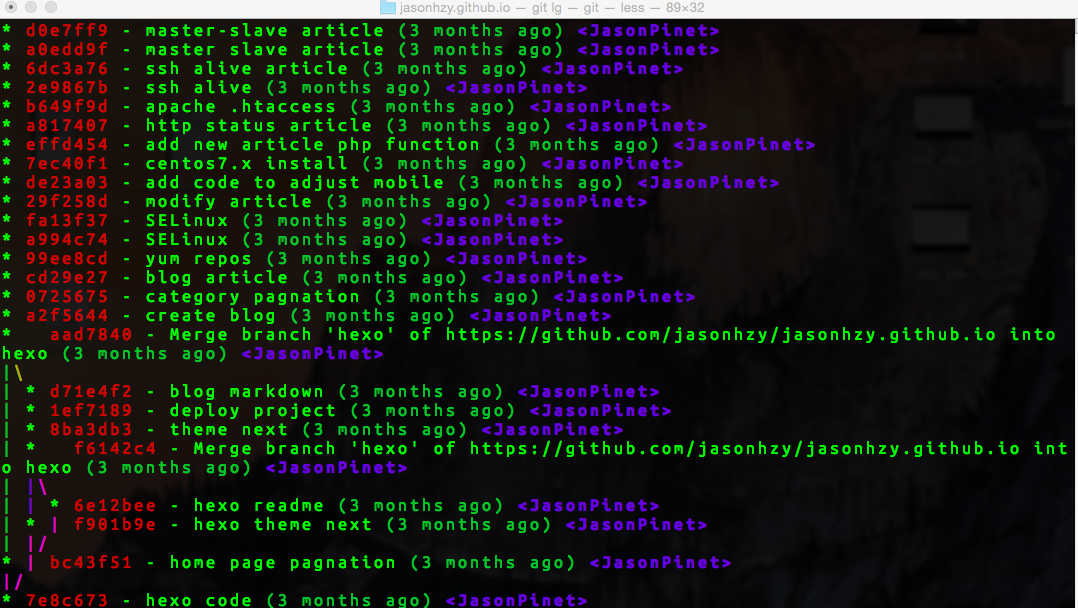
如果要查看更详细的log,即:git lg/log -p
Git log 输出格式化:
| 参数 | 说明 |
|---|---|
| %H | commit hash |
| %h | commit short hash |
| %T | tree hash |
| %t | tree short hash |
| %P | parent hash |
| %p | parent short hash |
| %an | 作者名字 |
| %aN | .mailmap 中对应的作者名字 |
| %ae | 作者邮箱 |
| %aE | .mailmap 中对应的作者邮箱 |
| %ad | –date=制定的日期格式 |
| %aD | RFC2822 日期格式 |
| %ar | 日期格式,例如:1 day ago |
| %at | UNIX timestamp 日期格式 |
| %ai | ISO 8601 日期格式 |
| %cn | 提交者名字 |
| %cN | .mailmap 对应的提交的名字 |
| %ce | 提交者邮箱 |
| %cE | .mailmap 对应的提交者的邮箱 |
| %cd | –data=制定的提交日期的格式 |
| %cD | RFC2822 提交日期的格式 |
| %cr | 提交日期的格式,例如:1day ago |
| %ct | UNIX timestamp 提交日期的格式 |
| %ci | ISO 8601 提交日期的格式 |
| %d | ref 名称 |
| %e | encoding |
| %s | commit 信息标题 |
| %f | 过滤commit信息的标题使之可以作为文件名 |
| %b | commit 信息内容 |
| %N | commit notes |
| %gD | reflog selector, e.g., refs/stash@{1} |
| %gd | shortened reflog selector, e.g., stash@{1} |
| %gs | reflog subject |
| %Cred | 切换至红色 |
| %Cgreen | 切换至绿色 |
| %Cblue | 切换至蓝色 |
| %Creset | 重设颜色 |
| %C(color) | 制定颜色,as described in color.branch.* config option |
| %m | left right or boundary mark |
| %n | 换行 |
| %% | a raw % |
| %x00 | print a byte from a hex code |
| %w([[,[,]]]) | switch line wrapping, like the -w option of git-shortlog(1). |
Git log 命令支持的选项
-p 按补丁格式显示每个更新之间的差异。
–stat 显示每次更新的文件修改统计信息。
–shortstat 只显示 –stat 中最后的行数修改添加移除统计。
–name-only 仅在提交信息后显示已修改的文件清单。
–name-status 显示新增、修改、删除的文件清单。
–abbrev-commit 仅显示 SHA-1 的前几个字符,而非所有的 40 个字符。
–relative-date 使用较短的相对时间显示(比如,“2 weeks ago”)。
–graph 显示 ASCII 图形表示的分支合并历史。
–pretty 使用其他格式显示历史提交信息。可用的选项包括oneline,short,full,fuller 和 format(后跟指定格式)。